Saturday, April 21, 2012

Installing Exchange 2010 Prerequisites on Server 2008 R2 using PowerShell


You can install Windows Server 2008 R2 operating system prerequisites of Exchange 2010 using xml scripts found in  scripts catalogue on the Exchange media as following:
  • Open PowerShell
  • Navigate to your Exchange media “for example: D drive”
  • Navigate to Scripts folder on Exchange media
 set-location “d:\Scripts”
  • Execute the following script [this will install all prerequisites for all roles]
    ServerManagerCMD –IP Exchange-all.xml 
  • If any of the required prerequisites is already installed, it will be skipped.

Saturday, November 20, 2010

Check SQL port for a named instance

When creating a name instance (beside the default one), the sql port is dynamically configured.
You need to change this dynamic port to a fixed one.

Friday, November 19, 2010

How to change SQL DB collation after setup

In some cases, you may need to change the DB collation (rebuild the DB) after setup (in my case I was installing SP 2010 and I choose a wrong collation, it needs an instance that performs case-insensitive & non-binary comparisons).

Thursday, November 18, 2010

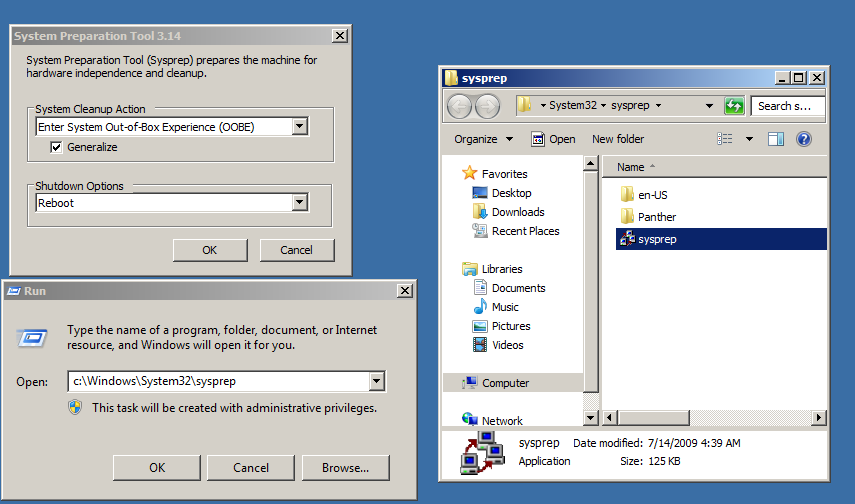
How to Sysprep Windows 7 & Windows server 2008 R2

Every time you need to create a virtual machine, you don’t have to install the OS over & over. All you have to do is create 1 VM with the desired OS, then sysprep it & make it ready to use whenever you need.

All you have to do is, go to c:\windows\system32\sysprep. Then choose generalize & shutdown to create new SID for the VM. After shutdown, take a clone of it (if you are using VMware workstation) or export the VM (if you are using Hyper-v).

image